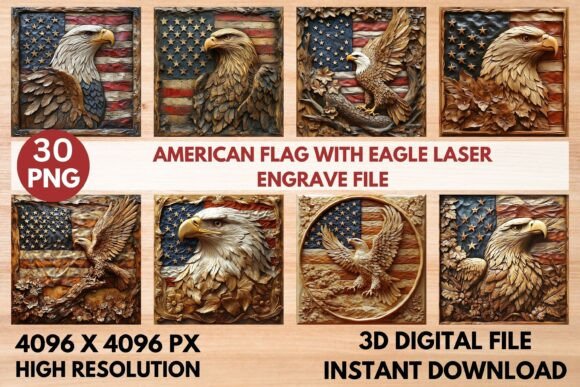
American Flag Laser Engrave File
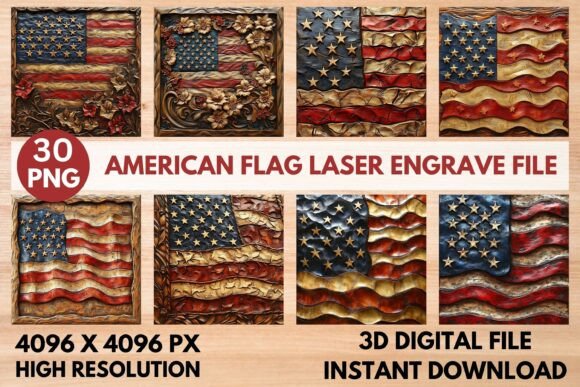
The American Flag Laser Engrave File is a high-quality grayscale PNG file designed specifically for laser engraving applications. This digital asset provides users with the precision and detail needed to create stunning engravings on a variety of materials, including wood, acrylic, and fabric. Whether you're working on home decor, custom signs, or personalized gifts, this file offers a versatile solution that fits seamlessly into your creative workflow.
Optimized for popular laser engraving machines such as Glowforge, LightBurn, xTool, Sculpfun, and CO2 laser cutters, the American Flag Laser Engrave File ensures consistent and professional results. Its high-resolution format, 4096 x 4096 pixels, allows for sharp details and smooth gradients, making it ideal for intricate designs that require accuracy and clarity.
What’s Included in the File Set
The American Flag Laser Engrave File includes 15 coloring PNG files and 15 grayscale PNG files, each with transparent backgrounds. These files are ready to print and can be used directly with your laser engraving machine without the need for additional editing. The transparent background feature makes it easy to integrate the design into different projects, allowing for greater flexibility in your creative process.
While the files are not editable, they are optimized for use with various laser engraving software. Users should be aware that resizing may be necessary depending on their specific project requirements. The file set is particularly useful for those who want to streamline their workflow by having pre-designed assets that are compatible with their equipment.
Recommended Machine Settings
To achieve the best results with the American Flag Laser Engrave File, it's important to use the recommended machine settings. For Glowforge users, a speed of 1000, power of 90, and grayscale with vary power settings are suggested. Additionally, setting the quality to max, lines per inch to 270, and using one pass without masking will help produce the highest quality engravings on lighter wood surfaces.
For LightBurn users, applying the Jarvis dither filter can enhance the engraving outcome when working with grayscale PNG files. These settings ensure that the design is rendered accurately and consistently, helping users avoid common issues such as overburning or under-engraving.
Integrating the American Flag Laser Engrave File into Your Workflow
The American Flag Laser Engrave File can be used at various stages of a project, from initial planning to final execution. Before starting a project, users can review the file to determine if it meets their design needs. During the project, the file serves as a reliable template that can be applied to different materials and surfaces. After the project is complete, the file can be stored for future use, ensuring consistency across multiple engravings.
When integrating this file into your workflow, consider how it interacts with other tools and resources. For example, if you're using a laser engraving machine, make sure the file is compatible with your software and hardware. Additionally, think about how the file fits into your overall design strategy. If you're creating a series of engraved items, using the same file can help maintain a cohesive look across all pieces.
Practical Implementation Tips
One practical tip for using the American Flag Laser Engrave File is to test it on a small sample before applying it to a larger project. This allows you to fine-tune your machine settings and ensure that the design looks exactly as intended. Testing also helps identify any potential issues, such as alignment problems or material compatibility concerns.
Another useful tip is to organize your files properly. Keep the American Flag Laser Engrave File in a designated folder so that it's easily accessible when needed. This can save time and reduce frustration, especially if you're working on multiple projects simultaneously. Additionally, consider backing up the file to prevent data loss, especially if it's a critical part of your workflow.
Factors to Consider for Long-Term Use
When using the American Flag Laser Engrave File over an extended period, several factors should be considered to ensure continued success. Preparation is key—make sure your laser engraving machine is properly maintained and calibrated to avoid inconsistencies in the final product. Compatibility is another important factor; check that the file works with your current software and hardware setup.
Usability is also a consideration. If you're using the file frequently, it's important to have a streamlined process for accessing and applying it. Organization plays a role here as well, as keeping your files structured can improve efficiency. Consistency in quality control is essential, so regularly inspect your engravings to ensure they meet your standards.
Enhancing Creativity with the American Flag Laser Engrave File
The American Flag Laser Engrave File is more than just a design tool—it's a resource that can inspire creativity and innovation. By incorporating this file into your projects, you can explore new ideas and push the boundaries of what's possible with laser engraving. Whether you're creating custom gifts, promotional materials, or artistic pieces, the file provides a solid foundation for your work.
Additionally, the file can be used in conjunction with other design elements to create unique and personalized pieces. For instance, combining it with text, logos, or other graphics can add depth and complexity to your engravings. This versatility makes the American Flag Laser Engrave File a valuable asset for anyone looking to expand their creative capabilities.
Conclusion
The American Flag Laser Engrave File is a powerful tool that can elevate your laser engraving projects. With its high-resolution design, compatibility with popular machines, and ease of use, it offers a reliable solution for both beginners and experienced users. By integrating this file into your workflow, you can streamline your process, improve the quality of your engravings, and unlock new creative possibilities.
Whether you're crafting home decor, personalizing gifts, or producing commercial items, the American Flag Laser Engrave File is a must-have resource that can help you achieve professional results. With the right preparation, settings, and organization, you can make the most of this file and take your laser engraving skills to the next level.